
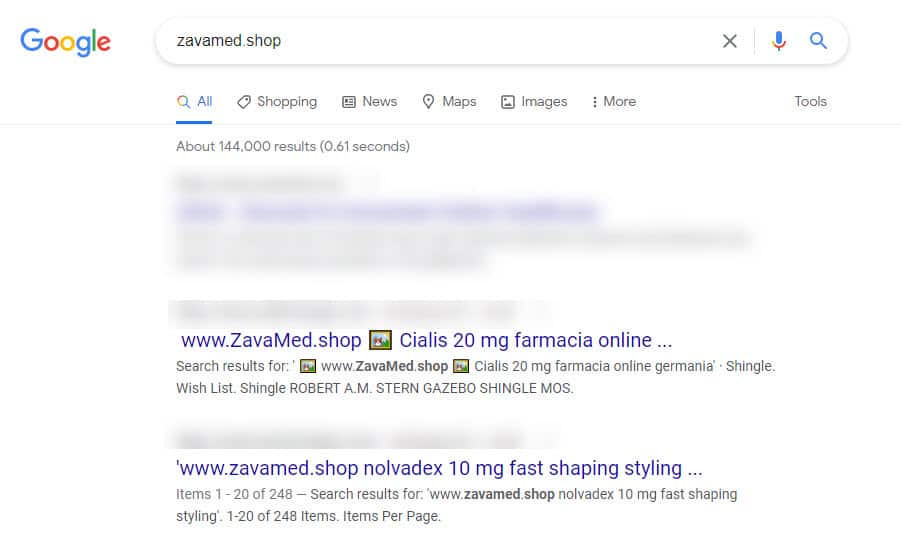
Have you ever noticed strange, spam‑like URLs piling up in your Google Search Console, even though your site didn’t look obviously compromised?
I did.
During a routine SEO audit, I discovered that my old WordPress site was generating hundreds of thousands of internal search‑based URLs—many of them promoted by external spam networks. This wasn’t a traditional backlink attack; it was a quieter, more technical one: WordPress internal site search spam.
In this post, I’ll walk you through:
- what internal site search spam actually is,
- why it matters for products and SEO, and
- how I fixed it using WordPress filters and product‑level thinking—with no‑index as a safety layer.
What's going on then?
Some people in the SEO field think that "negative SEO" exists, but others don't. Could another site hurt your exposure and rankings by getting links from spam or bad sites? It's not as simple as Google says it is. Most sites will still have to deal with this issue.
There are many people who believe in bad SEO, even if it's not real. Some are even using their own site search to "attack" other sites.
That has effects in the real world that are worth looking into and learning about. We're already taking steps to protect you in Yoast SEO. Here's what's going on.
In this article, I'll guide you through the process of banishing those pesky search spam results with a sprinkle of tech magic and a dash of creativity.
What is WordPress Internal Site Search Spam?
You've got a thriving WordPress blog, and suddenly, you notice an unwelcome visitor - search spam! And its creating 100s of thousands of spam pages on your blog.
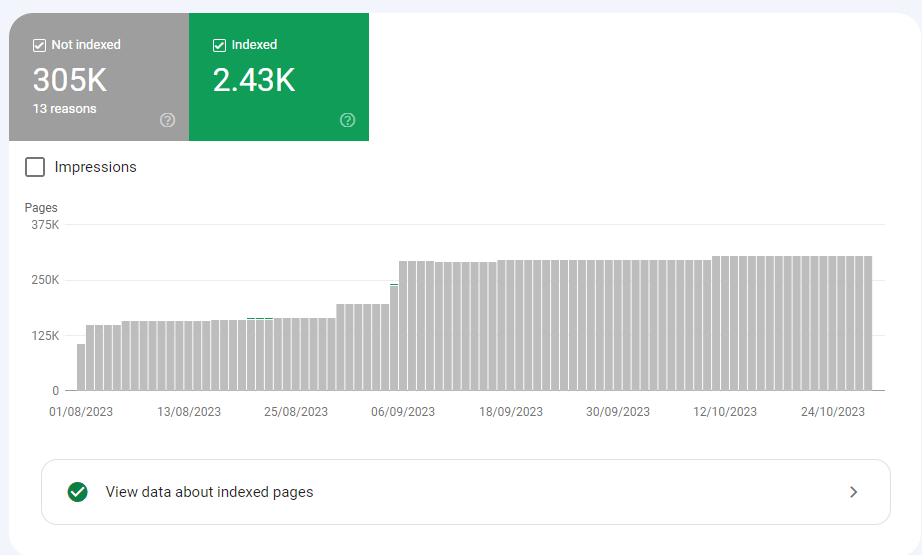
WordPress Internal Site Search Spam, also known simply as internal search spam, refers to a specific type of spamming activity that targets the internal search feature of a WordPress website.
Unlike traditional web spam, which targets search engines like Google, internal search spam focuses on manipulating the search results within a specific website's search bar.
Here's how internal site search spam typically works:
- Manipulating Search Queries: Spammers enter specific keywords or phrases into the website's search bar. These keywords are often unrelated to the website's content or services.
- Generating Fake Queries: Spammers use automated tools or scripts to generate a large volume of fake search queries. These queries might contain keywords related to products, services, or topics that the website doesn't actually offer.
- Polluting Search Results: The spam queries create misleading or irrelevant search results, cluttering the search results page with links to spammy or malicious websites.
Internal site search spam can be detrimental to a website's user experience in several ways:
- Misleading Users: Visitors might click on irrelevant search results, expecting to find information related to their query. Instead, they are redirected to unrelated or potentially harmful websites.
- Reduced User Trust: Users might lose trust in the website if they consistently receive irrelevant or spammy search results, affecting their perception of the site's credibility.
- Negative SEO Impact: If search engines notice an abundance of low-quality or spammy internal search results, it could potentially impact the website's overall search engine rankings.
Why This Matters for Product, SEO, and UX
From a product‑growth perspective, internal search spam is dangerous because:
- It wastes crawl budget.
Google may spend time crawling thousands of fake search‑based URLs instead of your important product pages. - It distorts analytics.
Internal search spam can inflate sessions, bounce rates, and paths that don’t represent real user behavior. - It can hurt trust and UX.
If users actually reach these URLs (via search or navigation), they’ll see irrelevant or confusing content, which damages your brand perception. - It reveals a product‑level security gap.
If your internal search is open‑ended and unfiltered, it effectively becomes an attack surface anyone can hit at scale.
In my case, these URLs were technically “noindex,” but they were still being created in bulk, which signaled a deeper issue: my product‑level search logic needed hardening, not just SEO calming.
Noindex Solution
These threats shouldn't be a problem for most sites. You don't have to do anything to keep these URLs out of Google's search results; You just have to mark search results pages as noindex in your SEO plugin.
Things like this won't hurt your SEO even if you see them in Google Search Console.
But if these pages still bothers you in your search console i have come up with a solution for you.
WordPress Filters
Yes, WordPress filters offer a powerful solution to combat spammers misusing your website's search bar. Instead of letting spammers spread their unwanted content, why not turn the tables and block them right at the entrance – your search bar?
By employing WordPress filters, you can proactively prevent spammers from polluting your search results. Imagine your search bar as a guarded gate, allowing only genuine queries to pass through.
With a bit of code magic, you can filter out spammy requests, ensuring that your website serves authentic, relevant content to your visitors.
In essence, these filters act as your website's vigilant bouncers, intercepting and blocking spam attempts before they ever reach your audience.
It's a smart and efficient way to maintain the integrity of your site and offer an optimal user experience, free from unwanted distractions. So, let the filters do the work, and keep your search bar clean, secure, and spam-free!
Now how should you block them lets see.
Step 1: Open Your Theme's functions.php File
First things first, access your WordPress theme's "functions.php" file. It's like the secret code repository of your WordPress site.
Step 2: Add the block Code
Insert the following code snippet into your functions.php file. This code detects the pesky keyword "To66.Asia" and ensures it never sees the light of day on your search results page:
function block_specific_keyword_search($query) {
    if ($query->is_search) {
        $search_query = $query->query_vars['s'];

        // Check if the search query contains the blocked keyword
        if (stripos($search_query, 'To66.Asia') !== false) {
            // Display a warning message and disable search functionality
            echo '<script type="text/javascript">alert("Warning: Your search query contains blocked content. Please do not spread spam.");</script>';
            $query->is_search = false;
            $query->query_vars['s'] = false;
            $query->query['s'] = false;
        }
    }
    return $query;
}
add_filter('pre_get_posts', 'block_specific_keyword_search');
I've chosen to block the term "To66.Asia" because spammers have been using it to spread unwanted content.
However, you can adapt this technique to block any specific word or phrase that spammers are exploiting on your WordPress website.
Additionally, spammers often employ special characters to hide their content within search queries. To counter this, you can further enhance your website's security by blocking these special characters from search functionality.
To block special characters in WordPress search functionality, you can use a regular expression to sanitize the search query and remove any special characters.
Here's how you can implement this in your functions.php file:
function block_special_characters_in_search($search_query) {
    if (is_search() && !empty($search_query->query_vars['s'])) {
        // Remove special characters from the search query
        $search_query->set('s', preg_replace('/[^\p{L}\p{N}\s]/u', '', $search_query->query_vars['s']));
    }
    return $search_query;
}
add_filter('pre_get_posts', 'block_special_characters_in_search');
In this code, the preg_replace function is used with a regular expression to remove special characters from the search query. The '/[^\p{L}\p{N}\s]/u' regular expression pattern allows letters (\p{L}), numbers (\p{N}), and whitespace (\s) while excluding any other special characters.
This proactive approach helps prevent spammers from manipulating your site's search results and ensures a cleaner, more reliable user experience.
Step 3: Customize and Test
Feel free to customize the warning message and the blocked keyword according to your needs. Once you've made your changes, test it out to ensure it's working like a charm!
And you will start noticing after some days these pages are getting removed from your search console as well.
Video
Results and Product‑Level Impact
After deploying these changes:
- The number of spammy internal search URLs in Google Search Console gradually declined.
- Crawl budget was reclaimed for real product pages.
- My analytics data became more reliable, as fewer phantom sessions were generated from fake search paths.
More importantly, I stopped treating this as a WordPress “problem to Google about” and instead as a product‑level decision: harden the search feature, monitor abuse, and design for edge cases.
Key Takeaways for Product‑Focused Engineers and PMs
Internal site search isn’t just a small UX widget. It’s a product‑level feature that can be exploited if left open‑ended. Here’s how I now think about it:
- Assume abuse will happen.
Any open input field can be turned into an attack surface at scale. - Treat search like a security boundary.
Implement filters, sanitization, and logging for internal search queries early. - Balance safety and usability.
Don’t lock it down so much that legitimate users suffer, but do remove obvious spam vectors. - EEAT‑style transparency matters.
Explaining how you detected and fixed this kind of issue builds experience, expertise, and trust with both users and search engines.

Comments