
I remember the first time I was asked to build a product roadmap.
I was sitting in a meeting room with my engineering lead, the CEO, and a VP of Sales — each of them with a list of features they "urgently needed." I opened a blank Confluence page, stared at it for about 30 seconds, and then confidently typed: "Roadmap - Draft v1."
That was it. That was my plan.
Spoiler: that roadmap lasted about two weeks before everyone agreed it was useless.
Six years and a lot of painful roadmap cycles later, I actually know what I'm doing. And today I want to give you the exact step-by-step process I use to build a product roadmap from scratch — one that your team trusts, your stakeholders respect, and actually gets executed.
Whether you're a new PM building your first roadmap or a seasoned one who just wants to tighten up your process — this guide is for you.
First, What Is a Product Roadmap?
Let's not overcomplicate this.
A product roadmap is a shared, strategic document that communicates where your product is going, why it's going there, and roughly when key milestones will be reached.
That's it. It is NOT:
- A sprint backlog
- A feature wishlist from sales
- A Gantt chart with 80 line items
- A promise to ship everything on it by a fixed date
The keyword here is strategic. A roadmap operates above the task level. It tells the story of your product's direction — so everyone from engineering to the CEO is rowing in the same direction.
Think of it this way: your product backlog is the "what," your sprint plan is the "how," but your roadmap is the "why and when."
3 Types of Product Roadmaps You Should Know
Before you start building, you need to know which type of roadmap you're creating — because the format changes based on your audience.
| Type | Best For | Time Horizon |
|---|---|---|
| Feature-Based Roadmap | Engineering teams, sprint planning | Quarterly |
| Goal/Outcome-Based Roadmap | Leadership, strategy reviews | 6–12 months |
| Now-Next-Later Roadmap | Early-stage products, fast-moving startups | Rolling |
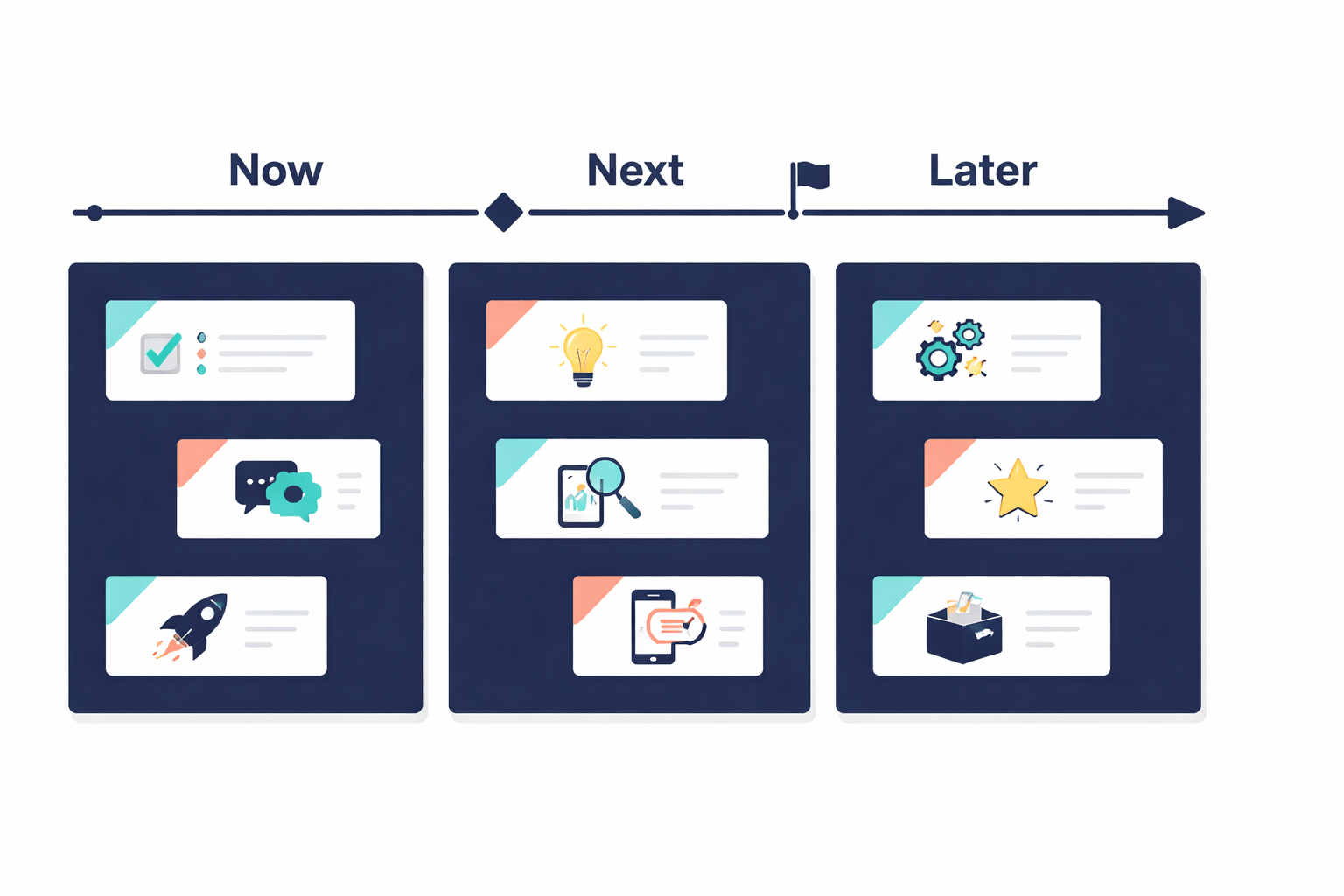
My personal go-to? The Now-Next-Later format. It removes the pressure of fake deadlines, keeps conversations focused on priorities, and forces your team to think in outcomes — not just outputs.
Step 1: Start With Vision, Not Features
This is where 90% of product managers go wrong — including me, early in my career.
Everyone wants to jump straight to the features list. But if you don't know why your product exists and what problem it's solving, your roadmap is just a to-do list with a fancy title.
Before you write a single feature on your roadmap, answer these three questions:
- What is the core customer problem this product exists to solve?
- What does success look like 12–18 months from now?
- What business outcomes does this roadmap need to support? (revenue growth, retention, cost reduction, market expansion)
Write these down. Seriously — put them at the top of your roadmap document. Every time someone asks "why isn't X on the roadmap?", you point them back to this.
Example: If your North Star is "reduce time-to-value for new users," then an onboarding redesign belongs on your roadmap. A new dashboard theme does not. Simple filter. Powerful results.
Step 2: Talk to Everyone Before Writing Anything
A roadmap that lives inside your head is not a roadmap — it's a personal opinion document.
Before building the roadmap, you need inputs from four key sources:
- Users/Customers — What are their top pain points? What are they asking for repeatedly? What's causing churn?
- Sales & Customer Success — What deals are being lost because of missing features? What's the #1 objection in demos?
- Engineering & Design — What's the technical debt eating capacity? What are they excited to build?
- Leadership/Business — What are the company's strategic bets for this year? What revenue targets are we against?
You don't have to do all of this in one sprint. But you DO need to collect these inputs before prioritizing anything. A roadmap created in isolation breeds distrust and misses important perspectives.
Pro tip: Use a simple intake form in Notion or Google Forms to collect roadmap input from stakeholders asynchronously. This saves hours of meetings and gives you a paper trail when someone later says "I never got to give input."
Step 3: Prioritize Ruthlessly (Use a Framework)
Here's the hard truth: you can't build everything. And trying to will result in a bloated roadmap that ships nothing well.
Prioritization is the single most important skill in product management — and a framework makes it defensible and objective.
Here are the three I use most:
RICE Framework
Score each initiative on: Reach × Impact × Confidence ÷ Effort
- Reach: How many users does this affect per quarter?
- Impact: How much will this move your key metric? (1–3 scale)
- Confidence: How sure are you? (percentage)
- Effort: How many person-months will this take?
Higher score = higher priority. Clean, simple, and hard to argue with in stakeholder meetings.
MoSCoW Method
Bucket every item into:
- Must Have — Product breaks without it
- Should Have — High value, not critical
- Could Have — Nice to have
- Won't Have (this cycle) — Explicitly not now
Now-Next-Later
- Now = What we're actively building
- Next = What comes after this quarter
- Later = Directional, no commitments yet
My recommendation: use RICE for scoring individual features, then use Now-Next-Later to present the output to your team. You get objectivity on the backend and clarity on the front.
Step 4: Group Into Themes, Not Feature Dumps
Once you've prioritized your items, don't just list 40 features in a spreadsheet and call it a roadmap.
Group related features into strategic themes — 3 to 5 buckets that tell a coherent story.
Bad roadmap:
Feature 1, Feature 2, Feature 3, Feature 4, Feature 5...
Good roadmap:
Theme: Improve Onboarding → [Features A, B, C]
Theme: Reduce Churn → [Features D, E]
Theme: Unlock Enterprise → [Features F, G, H]
This does two things: it makes the roadmap infinitely easier to present to executives, and it forces you to verify that everything you're building has a strategic home. If a feature doesn't belong to any theme, it probably doesn't belong on the roadmap.
Step 5: Choose the Right Format for the Right Audience
Here's something I learned the hard way: one roadmap does not fit all audiences.
Your engineering team needs specifics. Your CEO needs the big picture. Your customers need confidence, not commitments.
| Audience | What They Need | Format |
|---|---|---|
| Engineering Team | Prioritized epics, dependencies, effort estimates | Detailed feature roadmap (Jira/Linear) |
| Executives / CEO | Strategic themes, business outcomes, timelines | High-level Now-Next-Later or goal-based deck |
| Sales / CS Teams | What's coming and roughly when | Simplified roadmap, no internal details |
| External / Customers | Direction and commitment areas | Public roadmap (Canny, ProductLift) |
Build ONE source of truth internally — then create audience-specific views from it. Tools like Productboard, Craft.io, or even a well-structured Notion page can generate these views without you maintaining four separate documents.
Step 6: Get Stakeholder Buy-In Before You Publish
A roadmap without alignment is just a wish list.
Before you publish or share your roadmap widely, walk the key stakeholders through it individually — especially engineering leadership and your manager or CEO.
Here's my exact process:
- Share a draft with a 48-hour window for async comments
- Schedule a 30-minute review with engineering to validate effort estimates and flag dependencies
- Walk through it with leadership — frame every theme around business outcomes, not features
- Make adjustments, document the rationale for what changed and what didn't
- Publish with a version date so everyone knows which version is current
This process prevents the "I never agreed to this" conversation three months later. And trust me, that conversation always happens if you skip the alignment step.
Step 7: Treat It as a Living Document, Not a Contract
This is the biggest mindset shift for new PMs.
Your roadmap will change. It has to. Markets shift, competitors ship, bugs happen, priorities evolve. The goal of a roadmap is not to predict the future perfectly — it's to create alignment around current thinking while staying flexible.
What this means practically:
- Review your roadmap every 4–6 weeks — does it still reflect your current strategy?
- Communicate changes proactively — if something moves or gets cut, tell stakeholders before they ask
- Use time horizons instead of fixed dates where possible — "Q3" is a commitment; "Next Quarter" is a direction
- Keep a changelog — a simple "what changed and why" note at the bottom of your roadmap builds enormous trust over time
A roadmap that never changes isn't a good roadmap — it's a sign that nobody's actually using it.
5 Roadmap Mistakes I See PMs Make All the Time
I've made every one of these. Learn from my suffering.
1. Building a feature list, not a strategy — Features are outputs. Your roadmap should be built around outcomes: what changes for users or the business when this ships?
2. Letting the loudest stakeholder win — If your Sales VP can override your roadmap in a 15-minute meeting, you don't have a roadmap. You have a hostage negotiation. Tie every decision back to your prioritization framework and vision.
3. Adding too much detail — A roadmap is a high-level strategic document. Specific engineering tasks, design specs, and acceptance criteria belong in Jira — not on the roadmap. Too much detail makes it rigid and unreadable.
4. Not mentioning assumptions and constraints — If a feature depends on a third-party API that isn't confirmed yet, say so. Explicitly call out assumptions with a note. This protects you later when things shift.
5. Creating it and forgetting it — I see this constantly. PMs spend 3 weeks building a beautiful roadmap in Q1, share it once, and then nobody looks at it again until Q3 planning. Roadmaps need regular reviews, updates, and communication to stay useful.
Tools I Recommend for Building Your Roadmap
You don't need a fancy tool to start — a well-structured Notion page or Google Sheet is perfectly fine for early-stage products. But as your team scales, purpose-built tools save a ton of time.
For early-stage / solo PMs:
- Notion (free, flexible, great for Now-Next-Later)
- Google Sheets (simple, shareable, version-controllable)
For growing teams:
- Linear (great if your team uses it for sprints too)
- Productboard (connects user feedback directly to roadmap items — my favourite)
- Craft.io (excellent for enterprise-level roadmapping)
For external / customer-facing roadmaps:
- Canny (best for public roadmaps + user voting)
- ProductLift (clean UI, easy to embed on your site)
My hot take: The tool matters less than the process. I've seen terrible roadmaps built in Product-board and excellent ones built in Google Sheets. Get the thinking right first, then pick a tool.
Quick Recap: Your Roadmap-Building Checklist
Before you publish your next product roadmap, run through this:
- Product vision is clearly defined and written at the top
- Inputs gathered from users, sales, engineering, and leadership
- Features prioritized using a scoring framework (RICE, MoSCoW)
- Items grouped into 3–5 strategic themes
- Audience-specific versions prepared (exec vs. engineering vs. sales)
- Key stakeholders have reviewed and signed off
- Time horizons used instead of hard dates where possible
- Assumptions and constraints are explicitly noted
- Review cadence is set (monthly or quarterly)
- Changelog section included
If you check all 10 of these, you've got a roadmap most senior PMs would be proud of.
Final Thought
Building a great product roadmap is less about the template and more about the thinking behind it.
The best roadmaps I've seen aren't the prettiest slides or the most detailed Jira boards. They're the ones where you can ask any team member — from an engineer to the CEO — "why are we building this?" and they all give you the same answer.
That alignment? That's the real output of a great roadmap.
If you found this useful, share it with a PM friend who's struggling with their roadmap. And if you want me to share the exact Notion template I use for the Now-Next-Later format, drop a comment below — I'll share it in the next post.






Comments